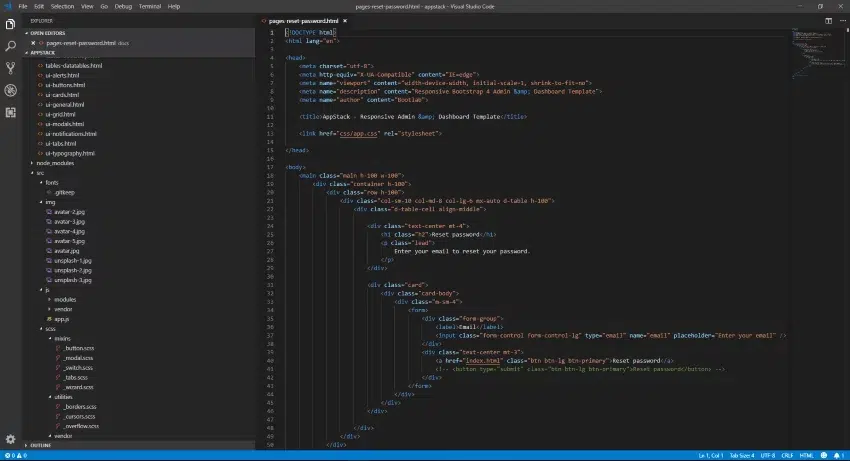
Visual Studio Code finally has a tree indent setting
The folder indent in the file list makes it nearly impossible for me to see the folder structure at a glance when folders are expanded.
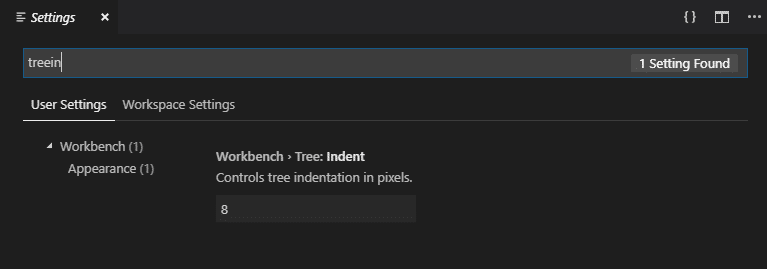
Thankfully, in a recent update, Microsoft have included a setting called Workbench > Tree: Indent that allows you to change this value. It defaults to 8, but allows your to increase it up to 20.
To get to the setting, simply type Ctrl + , in the editor window then type treein as you see below and you’ll find the setting. If you don’t see the setting, ensure your Visual Studio Code is up to date.
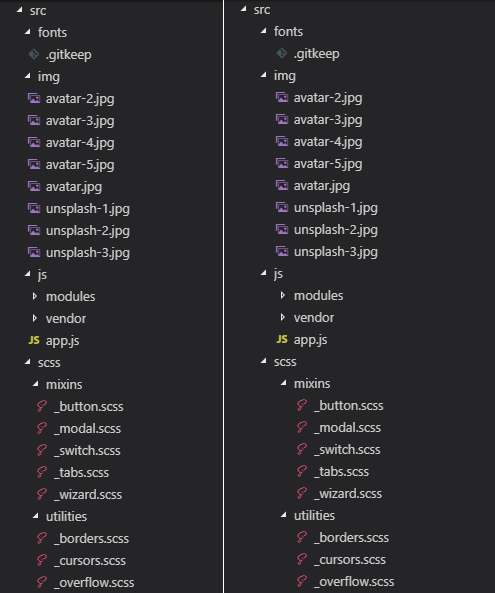
As you can see in the before and after image below, the indent is now far more visible and you can see at a glance where the folders and files are with respect to each other.

Simon Holman
.NET and Azure Developer
I write about .NET, Azure, and cloud development. Follow along for tips, tutorials, and best practices.
Related Posts

Resetting a DotNetNuke Host user password
A frequent question asked by customers is how to reset the DotNetNuke Host users password if you can’t remember what it is. If you have access to the database t

Ignore Azure Function false positive dependency failures using TelemetryInitializers
Let me start by saying that I love Appication Insights. The level of detail it gives you out of the box to monitor and troubleshoot application issues is

Handling new user registration with Auth0 and ASP.NET Core 3
When creating a new site that will have users logging into it, you'll invariably have to choose an identity provider to use. You can use the the inbuilt